Boosters
Cookie Shield
Server-side cookie regeneration. Recovers cookies deleted by Safari ITP, iOS, and ad blockers.
Overview
Cookie Shield is Wascer’s flagship tool for fighting the data loss from the modern browser privacy rules cause. It regenerates first-party cookies on the Server-Side, automatically recovering and resetting the cookies that Safari ITP (Intelligent Tracking Prevention), iOS restrictions, and ad blockers delete or shorten.
The problem that Cookie Shield solves is critical: Safari 16.4+ limits JavaScript-set cookies to 7 days. In practice, if a visitor clicks a Google Ads ad and only returns to buy 8 days later, the original cookies (_gcl_aw, _ga, _fbp) will already have expired. The conversion gets attributed to direct traffic, and Google Ads and Meta never find out the ad worked.
Cookie Shield handles this transparently: it stores cookie identifiers in a server-side master cookie (HTTP-only, first-party) that ITP can’t touch. When the visitor returns and the original cookies are gone, Cookie Shield rebuilds them from the master cookie and the attribution chain comes back intact. The whole process is invisible to the visitor and requires no action from them.
Benefits
- Recovers cookies wiped by Safari ITP 2.3+, iOS 14+, and browsers with anti-tracking protections.
- Extends cookie lifespan from 7 days (the ITP limit) up to 13 months (_ga, _fbp) or 90 days (_gcl_aw, _fbc).
- Restores proper conversion attribution — paid campaigns get credit for sales again.
- Cuts down inflated “Direct / (none)” traffic in GA4 and surfaces the real acquisition sources.
- Supports cookies from Google Analytics, Google Ads, Meta (Facebook), TikTok, LinkedIn, Pinterest, Snapchat, Klaviyo, and more.
- Runs 100% server-side and is fully transparent — no site changes or extra consent flow needed (it’s a first-party cookie).
Compatible with LGPD and GDPR: regenerated cookies are first-party and do not introduce new identifiers.
How it works
Cookie Shield works in three steps:
- Initial capture: on the user’s first visit, Cookie Shield captures the values of the supported tracking cookies (_ga, _fbp, _gcl_aw, _ttp, etc.) and stores them in an HTTP-only master cookie set by the server. Because this master cookie is first-party and set through an HTTP server response, it isn’t subject to the 7-day ITP limit.
- Loss detection: on later visits, the server checks whether the original tracking cookies are still in place. If Safari ITP, iOS, or an ad blocker has stripped them out, Cookie Shield notices they’re missing.
- Automatic regeneration: Cookie Shield reads the original values from the master cookie and resets them in the visitor’s browser through the server’s HTTP response. To every analytics and ad platform, the visitor still looks like the same user from the last visit attribution and interaction history in which it stays intact.
The whole thing happens at the HTTP server level, before any page JavaScript even runs. That means GA4, Meta Pixel, TikTok Pixel, and every other client-side tool will have the cookies ready from the very first millisecond of page load.
How to enable / configure
- Open the Wascer dashboard and select your sGTM container.
- Go to Boosters > Was Loader> Cookie Shield.
- Click Enable.
- Select the domain linked to the container.
- Enter the GTM ID of your web container (format: GTM-XXXXXX).
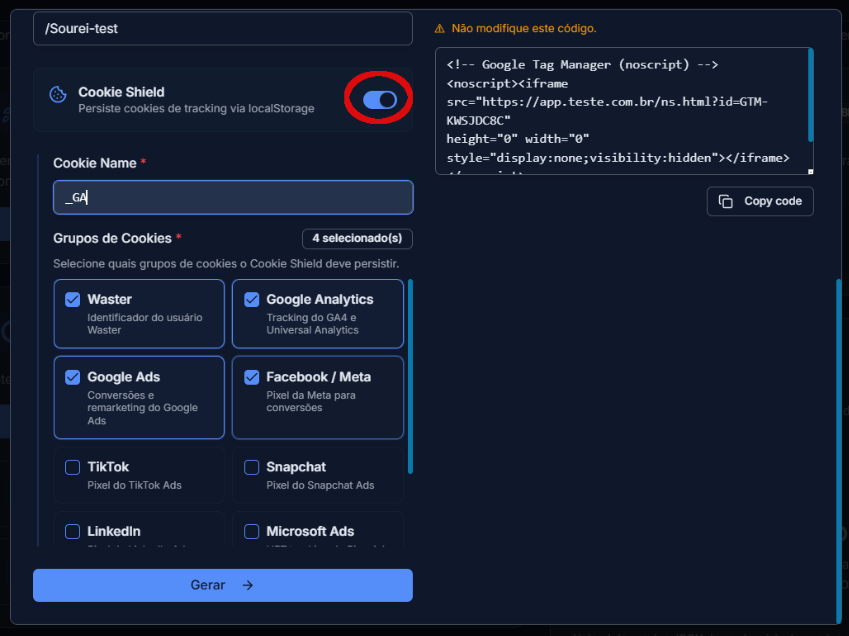
- In the Default cookies section, select which cookies you want to protect. The most common options include:
- Google Analytics: _ga, FPID (13 months)
- Google Ads: _gcl_aw, _gcl_au, FPGCLAW (90 days)
- Meta: _fbp, _fbc (90 days)
- TikTok: _ttp, ttclid (13 months / 30 days)
- LinkedIn: li_fat_id (90 days)
- Pinterest: _epik (90 days)
Snapchat: _scclid, _scid (90 / 400 days)
- (Optional) In the Custom cookies section, add extra cookies by name and set the expiration time you want.
- Select your site platform (Shopify, WordPress, etc.) or choose other for installation via JavaScript snippet.
- ClickGenerate configurationand follow the platform-specific installation instructions.
The Cookie Shield section in Was Loader lets you choose which cookie groups to protect:
Use cases
E-commerce with heavy Safari/iOS traffic: an online store discovered that 45% of its traffic came from Safari and iOS, and that the “Direct / (none)” channel in GA4 was eating 38% of all sessions. After enabling Cookie Shield, direct traffic dropped to 14%, while Paid Search grew 52% and Organic Social grew 28%. With attribution back in order, the team could reallocate media budget based on real data.
B2B lead generation with a long sales cycle: a SaaS company with a 30–60 day sales cycle was losing attribution on leads that came back after the 7-day ITP window. With Cookie Shield, GCLID and FBCLID stay alive for up to 90 days, so long-cycle conversions land back on the original Google Ads and Meta Ads campaigns.
Availability

Was this helpful?
Thanks for your feedback!