Boosters
User ID
A first-party identifier, written by your own server, that survives the expiration limits browsers apply to JavaScript-created cookies.
Overview
When a visitor returns to your site after a few days on Safari, or uses an ad blocker, traditional tracking cookies (_ga, _fbp, _gcl_aw, etc.) may already have been wiped out. User ID solves this by computing, server-side, a signature from characteristics of the request itself (IP, User-Agent, TLS and the domain being accessed) and returning that signature as a first-party cookie on your own domain: x-wascer-user-id. Nothing is generated in the browser.
Benefits
- Recognizes the same visitor across sessions, even without surviving browser cookies.
- Works entirely server-side, does not depend on JavaScript running in the visitor’s browser.
- Helps recover attribution for paid campaigns and expand remarketing audiences.
- The identifier is anonymous: it carries no email, phone number, or other direct personal data.
How It Works
- On every request, it’s Wascer’s own server (the proxy that already processes your container’s traffic that intercepts the request, computes the signature (from IP, User-Agent, TLS and host), and returns the x-wascer-user-id cookie on your domain.
- Because it’s written server-side, the cookie is not subject to the expiration limits browsers like Safari apply to cookies created via JavaScript.
- The same visitor always gets the same identifier as long as the request characteristics (IP, browser) hold. If they change, the cookie is rewritten.
How to Enable
- Go to the Wascer dashboard → Containers → select your container → Boosters tab.
- Find the User ID card.
- Turn on the switch. The badge changes to Active.

“User ID” card in the Boosters tab, disabled. Click the highlighted switch to enable it.

Switch enabled, “Active” badge.
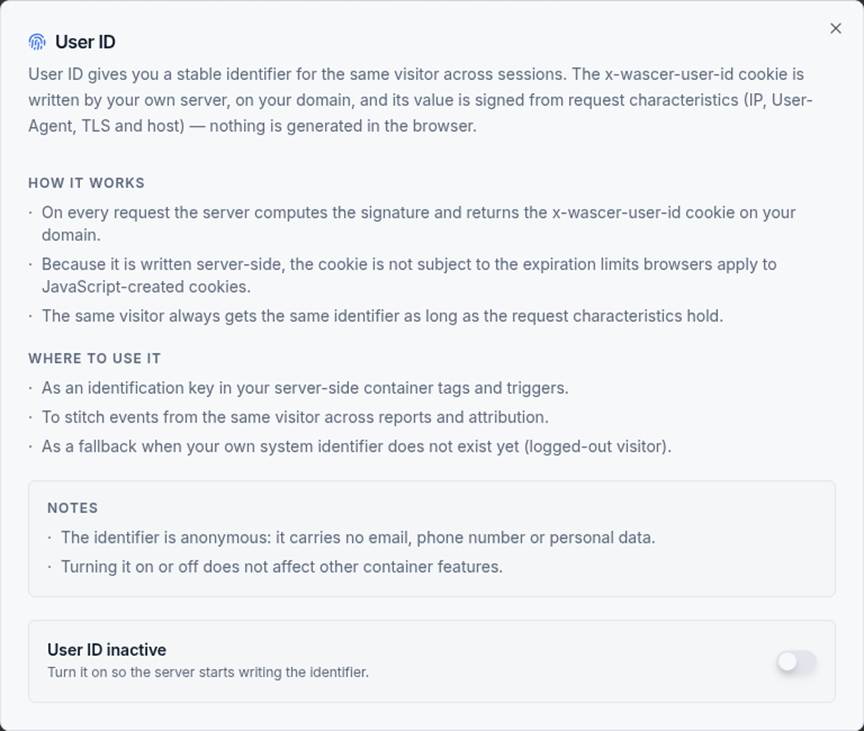
“Learn more” dialog: how it works, where to use it, and notes.
sGTM configuration
In your Server-Side Google Tag Manager container:
- Go to Variables → New → “Request” category → type Cookie Value.
- In the Cookie name field, enter x-wascer-user-id.
- Name the variable (e.g. user_id – wascer) and click Save.
- Use this variable as an identification key in your container’s tags and triggers, or to stitch together events from the same visitor across reports and attribution.
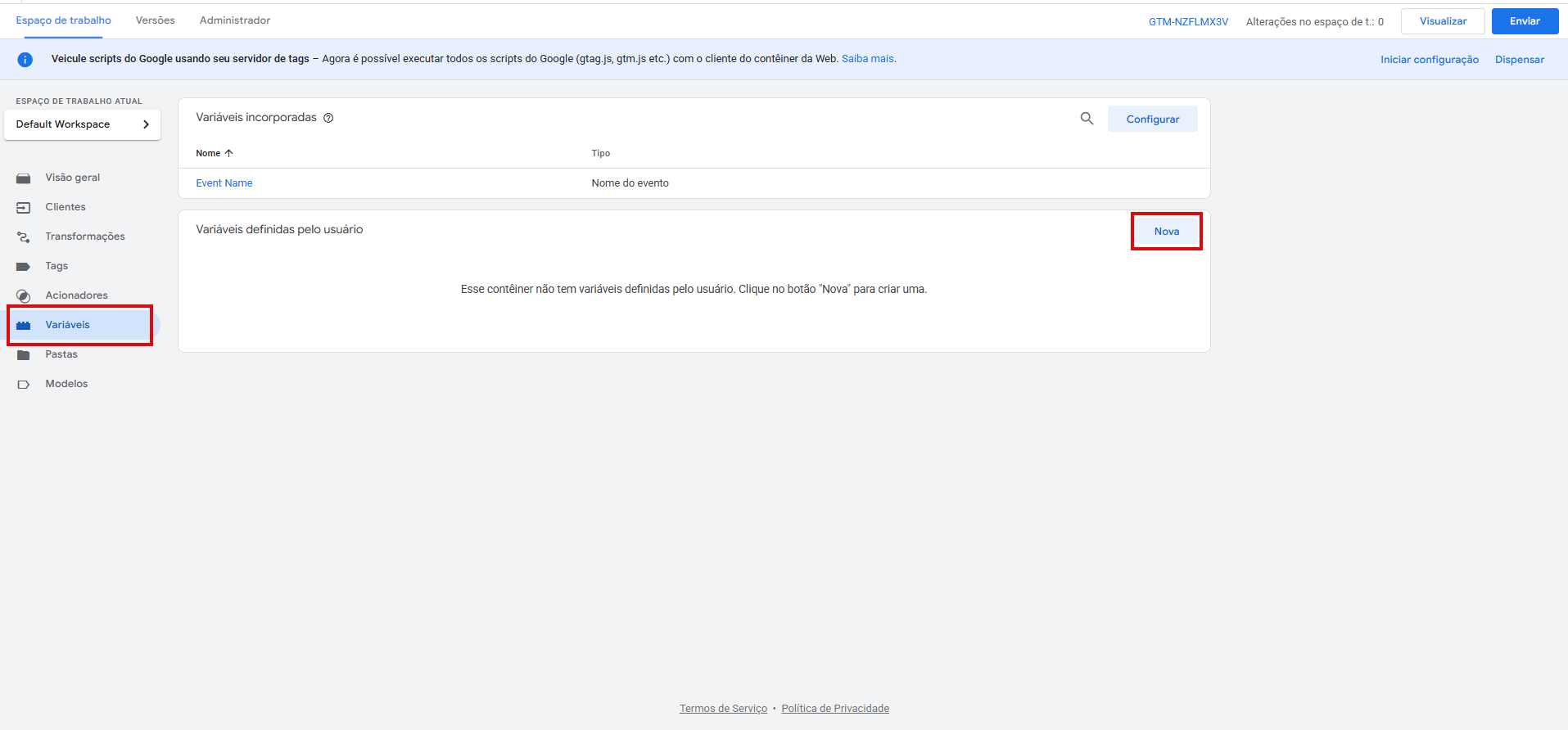
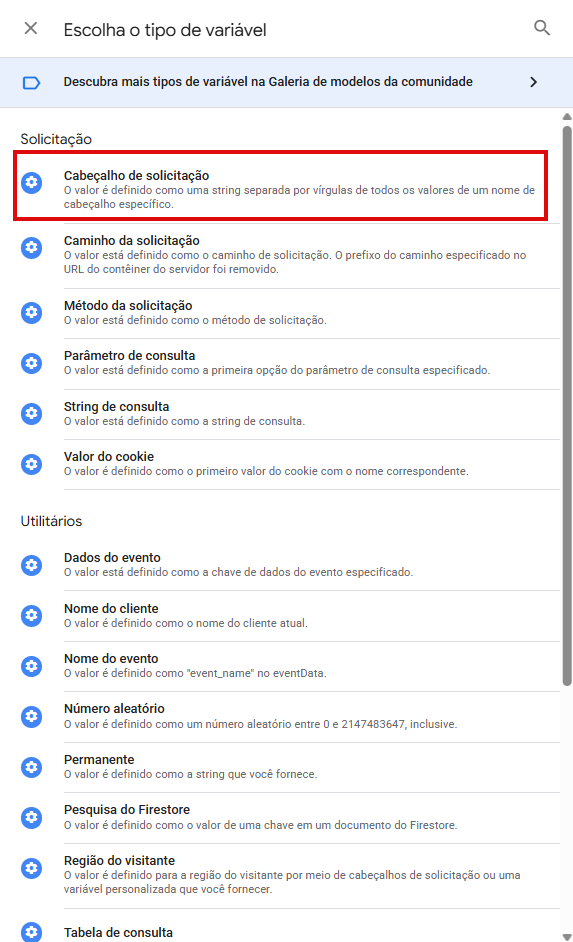
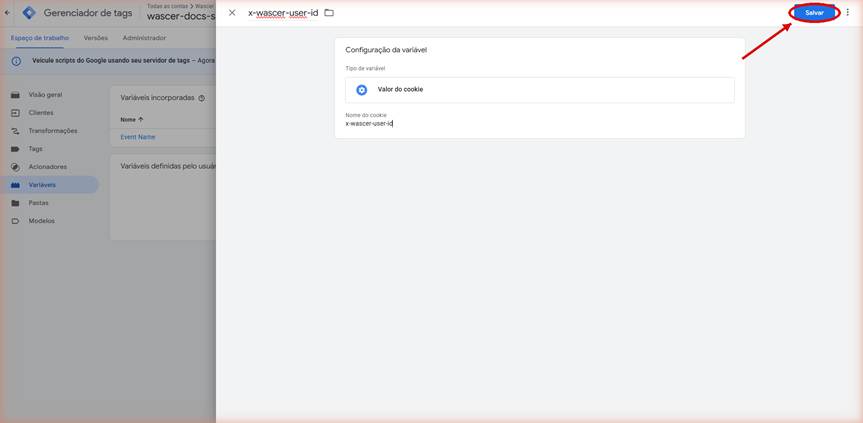
Creating the variable in server-side GTM: type “Cookie Value”, cookie name `x-wascer-user-id`. Click Save.
Use Cases
- Online store with mostly iOS/Safari traffic: recovers paid campaign attribution that would otherwise be lost to ITP’s aggressive cookie expiration.
- B2B SaaS: combines User ID with a hashed email to stitch the visitor’s journey together before and after login.
Privacy Notes (LGPD/GDPR)
The identifier is derived from IP and User-Agent, data that, under LGPD/GDPR, is considered personal data (even without directly identifying a person by name). Using User ID should follow the same legal bases and privacy notices you already apply to analytics/marketing cookies on your site: treat it as part of your cookie banner and policy, not as an “anonymous” identifier exempt from disclosure.
Availability
Available on all plans.
Was this helpful?
Thanks for your feedback!